 Moonkale
Plan: Milestone 11 - Remote. Design: Remote and Server Modes.
Steps 1–6 done (2026-09-21) — verified with a fake
ssh, the real server binary, a self-signed certificate, and the release desktop app on the KDE session (screenshot below)
File → Open Remote Folder…(ormoonkale --ssh host:/path): the systemsshruns in a terminal tab (keys, agent, passwords, host-key prompts exactly as in a shell), copiesmoonkale-serverto~/.local/share/moonkale/server/<version>/on the host the first time, starts it on the host’s loopback with a per-session token over stdin, forwards its port, and the desktop becomes that server’s client: the folder, its index, LSP, git, the terminal and Typst run there, the editor, the graph and the LLM keys stay here. The status bar reads⇅ host:path · connected; closing the folder (or Disconnect Remote) killssshand with it the remote server. Nothing is written to disk on either side but the binary. Standalone server:moonkale-server --port --bind --root --token-stdin --version;MOONKALE_TERMINAL=0refuses shells; cross-origin websocket upgrades get 403; TLS built in (MOONKALE_TLS_CERT/KEY), and a non-loopback bind is refused without it unlessMOONKALE_INSECURE_HTTP=1. New cratemoonkale-remote;api::client;ext-api::remote. Tests: the whole session against a fakessh(0.9 s), the workspace side in aVirtualDom,server.mjsagainst the real binary (6 checks),desktop/tests/remote.rsagainst a running server; 4 browser suites re-run; clippy/fmt clean.
Steps as executed
| # | step | outcome | notes |
|---|---|---|---|
| 1 | api::client — connect(url, token, label) / disconnect / active, the client-side WorkspaceConfig callbacks (sources, terminal, LSP, git, Typst, wasm) shared by the web client and the desktop; session_token(); desktop dispatchers check active(); MOONKALE_REMOTE + MOONKALE_TOKEN at start | ✅ desktop/tests/remote.rs (ignored) against the E2E server on 8090 and the token server on 8091: open root, read a .md, attach by descriptor, git status, wasm list; refused without the bearer | api.md, desktop.md |
| 2 | server flags --port --bind --root --token-stdin --version (in web/src/main.rs, server feature); MOONKALE_TERMINAL=0 → Exit with a message; auth::same_host + 403 on cross-origin websocket upgrades | ✅ server.mjs: token over stdin (and not in /proc/<pid>/cmdline), 401/200, terminal off, cross-origin 403 / same-origin 101 | the binary: cd packages/web && dx build --platform server [--release] → target/dx/web/<profile>/web/server |
| 3 | moonkale-remote: SshSession::open — control-master ssh under a PTY with the port forward and a remote sh script (probe → wait for upload → token with echo off → exec moonkale-server --token-stdin), upload over the multiplexed socket, wait_for_server, api::client::connect; TeeBackend (PTY → terminal tab + session reader); PtyBackend::{spawn_args, kill, is_running} | ✅ tests/shim.rs (ignored): fake ssh on PATH → Uploading → Starting → Ready, binary in the scratch HOME, open_folder + fetch_text through the session, close disconnects; with the release binary 0.9 s, with the 1.7 GB debug binary 3 s | remote.md |
| 4 | ext-api::remote (RemotePhase, RemoteSession, RemoteHosts, RemoteState), Workspace::{open_remote, close_remote, adopt_terminal, is_remote_source, remote_hosts}, Command::{OpenRemote, CloseRemote}; terminal panel adopts pushed sessions; ui::remote_dialog (hosts from ~/.ssh/config), File menu, palette remote.open/close, status item, Explorer icon; --ssh host:/path / MOONKALE_SSH at start | ✅ ext-api/tests/remote_flow.rs (a VirtualDom with a fake OpenRemote: prompt → status + terminal shown; ready → open_folder once, source flagged remote, recents untouched; close → session closed once, sources and documents gone); ssh_hosts_in unit test; the dialog itself needs a desktop display — Daniel’s look | ext-api.md, ui.md |
| 5 | auth::tls_files, bind_mode(ip, token, tls, insecure_ok); serve_tls in web/src/main.rs (axum-server + rustls/ring on the IP/PORT address) | ✅ server.mjs: --bind 0.0.0.0 with a token but no TLS → exit 2 with the reason; MOONKALE_INSECURE_HTTP=1 starts; with a self-signed cert HTTPS answers 200 (bearer) / 401, plain HTTP on that port does not; 4 bind_mode unit cases | |
| 6 | verify, log, vault | ✅ terminal, panels, menubar, palette browser suites re-run (the terminal panel and the menus changed); server added to run-all.sh; this note, crate notes, Problem Log P-095–P-097, Roadmap, Home, Project Structure, Remote and Server Modes |
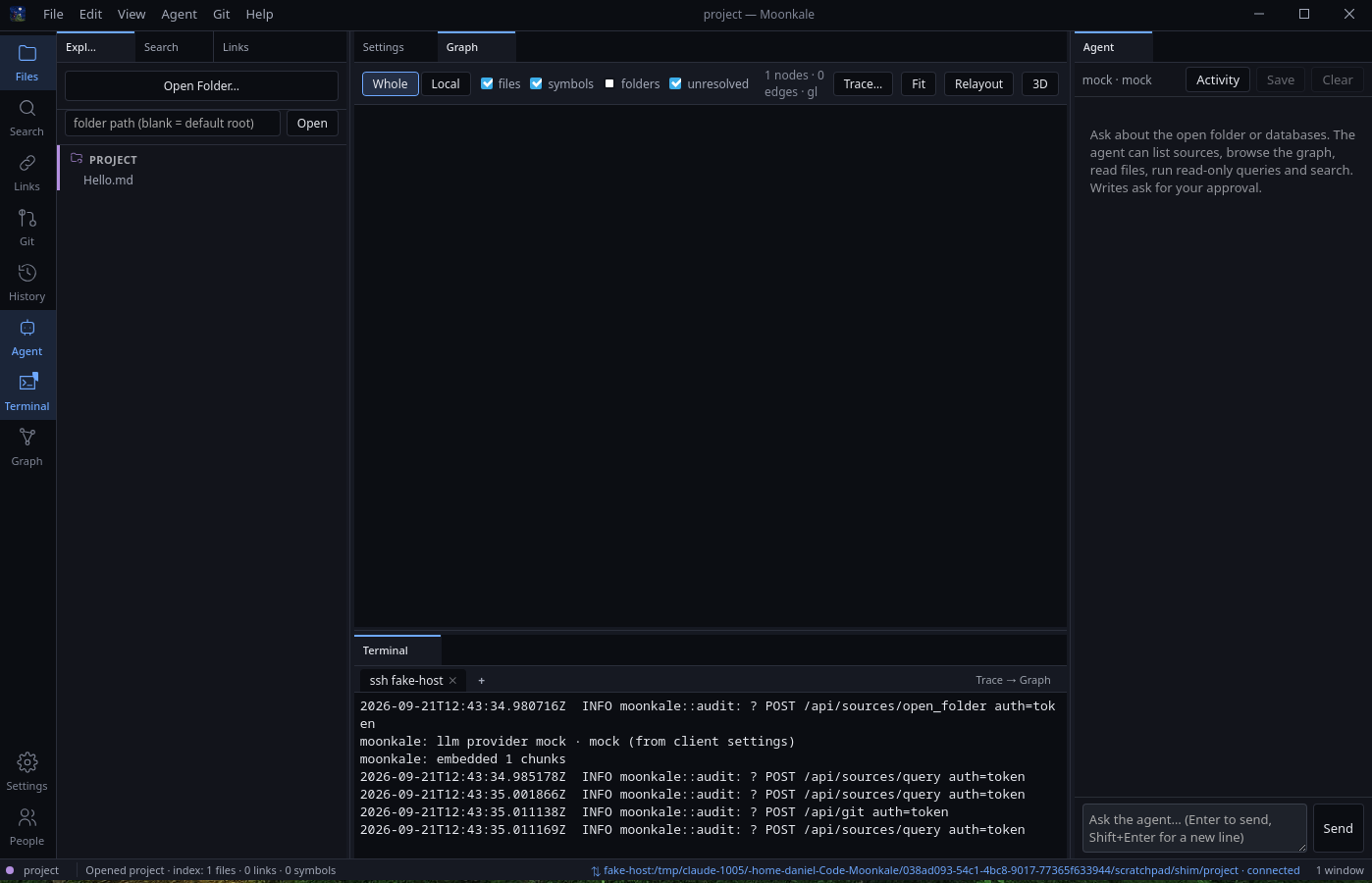 The release desktop app after
 moonkale --ssh fake-host:… against a fake ssh: the remote folder in the Explorer with the remote icon, the ssh fake-host tab showing the server’s audit lines, ⇅ fake-host:… · connected in the status bar.
What the user sees
- File → Open Remote Folder…: a host typed the way you would after
ssh—SSH_AUTH_SOCK=0 -p 443 -v daniel@192.168.178.62,-i ~/.ssh/MathStruct daniel@dtrmblog.de, an alias from~/.ssh/config(offered),ssh://me@host:443— and a folder path. LeadingVAR=valuewords become thesshprocess’s environment, the words before the last are its options, the last word is the destination; the same for--ssh "SSH_AUTH_SOCK=0 -p 443 daniel@192.168.178.62:/home/daniel/Code". (AHostblock in~/.ssh/configwithPort 443,IdentityFile,IdentityAgent nonedoes the same without typing it each time.) Connect → a terminal tabssh <host>opens wheresshasks whatever it asks; the status bar goesconnecting… → uploading the server… → starting the server… → connected, and the folder appears in the Explorer with the remote-folder icon. Everything then works as with a local folder — including a New Terminal, which is a shell on the host. - The first session per host and version copies the server (142 MB stripped release build; a few seconds on a LAN, minutes over a slow link); later sessions skip it.
- Disconnect Remote (File menu / palette) or closing the folder ends the session; the
sshtab shows the server’s last lines and can be closed. moonkale --ssh build-box:/srv/code(orMOONKALE_SSH=…) opens the session at start.- On a server you expose yourself:
MOONKALE_TLS_CERT=cert.pem MOONKALE_TLS_KEY=key.pem MOONKALE_TOKEN=… ./moonkale-server --bind 0.0.0.0 --port 8443 --root /srv/code; without the certificate it refuses to start off loopback;MOONKALE_TERMINAL=0for an editing-only server.
Deviations from the plan
- The host field is a whole
sshcommand line minus the wordssh, not just a host name: Daniel’s real hosts need-p 443,-i <key>andSSH_AUTH_SOCK=0(SshTarget::parse, added the same day; options and environment reach the mastersshunder the PTY and the uploadssh -Salike — the shim test demands both). - ControlMaster is used after all (
-M -S <socket> -o ControlPersist=no): the upload needs a second authenticated channel and a second password prompt would be wrong; the socket lives in a per-process temp dir and dies with the master, which Moonkale kills on close — the plan’s worry (sockets outliving Moonkale) does not apply. - No checksum on the upload yet, and no arch check beyond logging
uname -m: the binary travels over the authenticated, encrypted channel and lands through an atomicmv; a wrong architecture fails to exec and the terminal tab shows why. A signed release process (Milestone 12 candidate) brings the checksum. File → Connect to Server…(URL + token) is not a dialog yet — the desktop-as-client path exists (MOONKALE_REMOTE) and is what the SSH session uses; a dialog is a small follow-up once someone runs a LAN server.- One server at a time: while a session is connected every
open_foldergoes to the remote (the server-function URL is process-global); local folders come back after Disconnect. Mixing local and remote sources is the Projects and Sources work. - Cross-compiled builds (
aarch64-unknown-linux-gnu) were not produced: the upload takes whateverserver_binary()finds (MOONKALE_SERVER_BINARY, next to the executable, or the dev build); the release process decides how a desktop bundle carries a server for another architecture. - The server binary is large — 188 MB release, 142 MB stripped, 1.7 GB debug (DuckDB, wasmtime, tree-sitter, Typst) — and needs
public/next to its cwd (dioxus-server asserts the directory; the remote script creates an empty one; the remote server serves only the API). - The dialog itself was not clicked (no input injection), but once a display was available the whole session ran in the release desktop app via
MOONKALE_SSH: thesshtab showed a password prompt with “answer in the terminal” in the status bar (first run, prompting shim), then with a prompt-free shim upload → start → connected → the folder in the Explorer. That run found P-098 — dioxus’s server URL is aOnceLock, so switching servers at run time needs the loopback relay (api::relay) the desktop now installs before launch; without a display the shim test had set the URL first and never hit it.
Problems hit (→ Problem Log)
- P-095 the session token was echoed by the PTY: the script printed the prompt before
stty -echo, and the desktop answered faster than the shell could switch echo off → the order is nowstty -echo; echo MOONKALE_TOKEN?; read. - P-096 dioxus-server panics without a
public/directory next to the cwd (Couldn't read public directory) — the remote script creates an empty one. - P-097 no display for the desktop app at first (Xorg on
:0was sddm’s login screen; no Xvfb) — the workspace logic got aVirtualDomharness test (ext-api/tests/remote_flow.rs); later in the day Daniel switched the display on permanently and the app ran (P-099 has the launch recipe). - P-098
set_server_urlpanics after launch (aOnceLock) →api::relay, a loopback TCP relay the server functions always point at. - P-100 (found by Daniel on the same day) the graph’s zoom floor of 0.05 hid a 2 851-node graph:
MIN_SCALE0.002 and a fit on every layout frame — graph-render.md. - P-099 launching the app from a script:
env -iwith the session’s own display variables; the GTK Wayland backend fails under an inherited shell environment and WebKit’s DMA-BUF renderer fails under Xwayland here.
Numbers
moonkale-remote: 3 files, ~480 lines;ext-api::remote90 lines; workspace additions ~170 lines; dialog 90 lines.- Session to a fake host with the release binary: 0.9 s end-to-end (upload included, local disk).
- Server binary: 188 MB release (142 MB stripped), 1.7 GB debug; release build 229 s. Desktop app: 193 MB release (147 MB stripped) + 6.9 MB assets; release build 361 s.
- Desktop RSS with a remote folder open:
moonkale202 MB (48 MB anonymous, the rest the binary’s own pages) + WebKit web process ~485 MB (240 MB anonymous) + network process 61 MB — see Why Not a Plugin or Electron for the breakdown. - Tests: 3 native suites new (
remoteunit,remote/shim,ext-api/remote_flow),server.mjs(6 checks), 4 browser suites re-run; 34 browser suites inrun-all.sh.
Same-day follow-ups (specs 020–023, from Daniel’s first day with the build)
- 020 every open folder in one graph, coloured per folder, picker narrows to one (
graph.mjsstep). - 021 markdown opens in Rich mode (
editor.markdown_rich), and loading no longer dirties the file (P-102;rich.mjsstep). The E2E fixture turns Rich off in.moonkale/settings.json(andsession.mjsin the user scope) because the suites drive the source editor. - 022 Julia and Python symbols in the index (
tree-sitter-julia,tree-sitter-python; unit tests). - 023 the 30-minute build after a pull: two gigabyte debug binaries and feature changes (P-101);
[profile.dev] debug = "line-tables-only"+ no dependency debug info — clean debug build 399 s, binaries 449 + 470 MB; the agent’s cargo runs now useCARGO_TARGET_DIR=target/agent.serve.shwaits for the server to answer instead of dx’s banner (which appears before the build ends). - Full browser batch: 34/34 pass.
- Daniel’s first real session got stuck at
MOONKALE_NEED_UPLOAD→ a privatesshdon this machine (nushell as the login shell — the harshest case) reproduced four real-ssh problems the shim could not: P-103 login-shell quoting (base64-wrapped commands), P-104 no remote PTY (token echoed, server lingering —-t), P-105 port collisions (random port below the ephemeral range), P-106 no server binary found whendxruns the app from its bundle dir, failing silently (lookup to the workspace root; failures printed into thesshtab and the session ended).real_sshd_session_reaches_readynow covers the real path; the release app launched from its bundle dir uploads and connects.